

Wopisanje
Tickets & Passes adds three product types to WooCommerce: Ticket, Timeslot Ticket and Pass. Customers buy them like anything else in your shop, every purchase issues a QR code, and staff scan that code at the door from a phone browser.
Everything runs on your own site. There is no ticketing service to sign up for, no fee per ticket sold, and no account with anyone else.
Built for venues, attractions, museums, escape rooms, festivals, clubs and anyone who sells admission and then has to let people in.
Three product types
- Ticket – plain admission with a validity window and a set number of uses. Day tickets, entry tickets, gift admission. The customer can pick their own start date within a range you set, or you fix the date yourself.
- Timeslot Ticket – admission for a specific date and time, with a capacity per slot. Generate slots on a repeating schedule instead of building next month by hand. Unpaid reservations are released automatically, so an abandoned checkout never sits on a seat.
- Pass – valid across a period rather than a single visit: season passes, memberships, annual cards. Passes can include guest passes the holder gives away, carry a cardholder photo, and enforce a cooldown between scans.
Check-in at the door
- A scanner page on your own domain, at
/check-in/. Full screen, no admin bar, nothing for door staff to get lost in. - No app to install. Any modern mobile browser works. Where the phone has a native barcode detector the scanner uses it, otherwise it decodes in the page.
- Colour-coded results you choose: valid, already used, expired, on cooldown, or not found.
- Photo check on passes. Staff see the cardholder photo beside the scan result and can compare it with the person in front of them.
- A Scanner user role that grants check-in and nothing else in wp-admin.
- Every decision is made on your server, never on the phone, so a cancelled ticket cannot be waved through by putting the phone in airplane mode.
- A REST check-in API underneath, so a third-party or native scanner app can use the same endpoints.
Running it from wp-admin
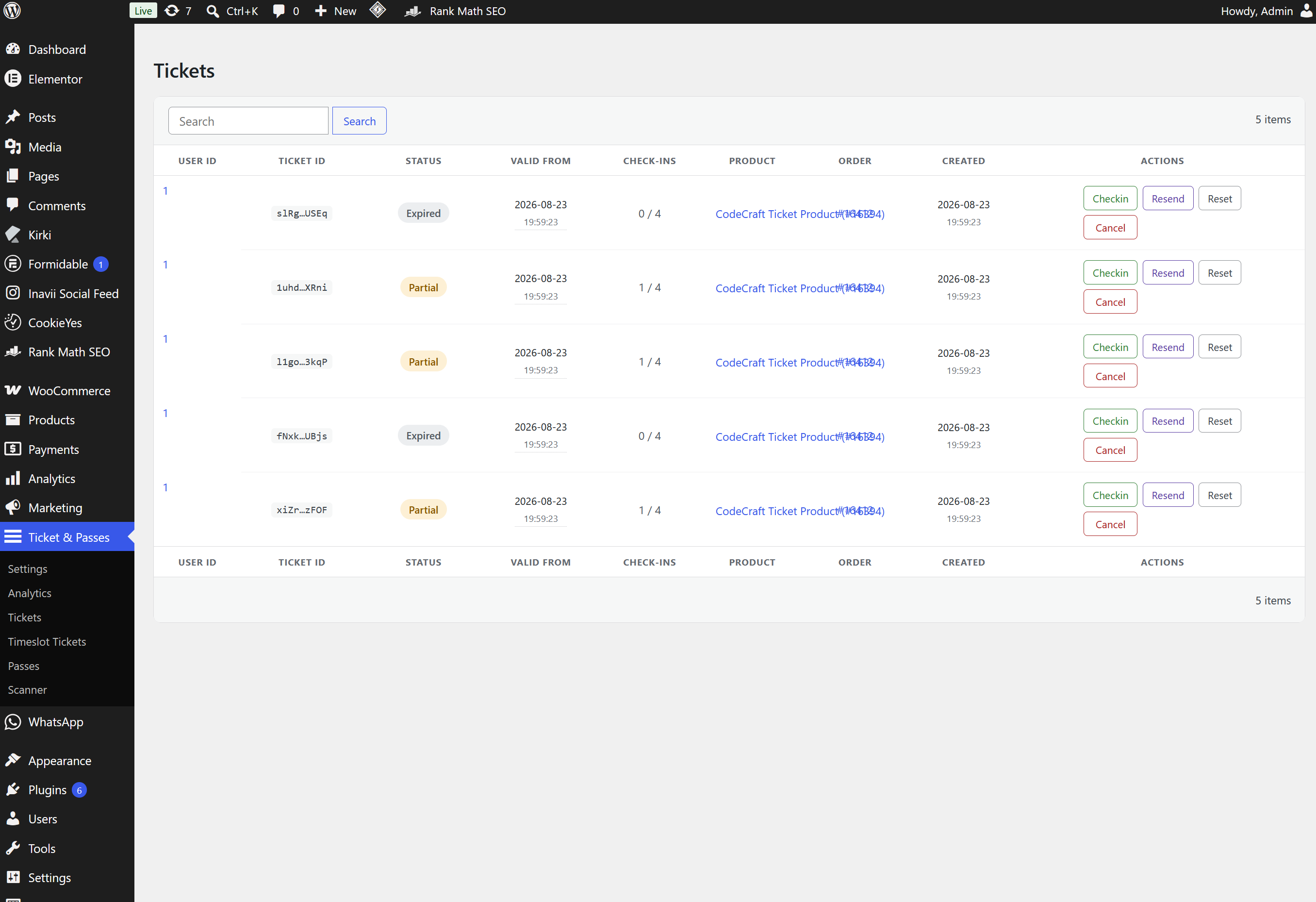
- A dashboard per product type – Tickets, Timeslot Tickets and Passes – each with search, manual check-in, resend, reset and cancel.
- Manual check-in for when there is no phone at the door.
- Analytics charting check-in activity by day and by hour, with a CSV export.
- Per-type colours and hint text, so a ticket looks like part of your site rather than part of a plugin.
- Shop Manager friendly. Everything is gated on
manage_woocommerce; nobody needs an Administrator account to run the door.
What your customers get
- Tickets and Passes tabs on the standard WooCommerce My Account page.
- The QR code on screen plus a printable PDF download.
- Live status on every ticket – active, used, expired, cancelled or not valid yet – with uses remaining.
- Add to Calendar on timeslot tickets, as a normal
.icsfile. - Guest passes handed out from the account page, and a photo upload where a pass asks for one.
Emails
- The WooCommerce order confirmation and completed order emails are extended with ticket, timeslot ticket and pass details.
- Resend Ticket and Resend Pass templates for a re-sent QR code.
- Gifted pass emails: when a buyer enters someone else’s email for a pass, that person receives it. If the address has no account, one is created and they get a link to choose a password.
- Every subject and body is edited in wp-admin and supports merge tags for order and ticket details.
Customer files stay private
QR codes, ticket PDFs and pass photos are not reachable at a guessable public URL. They live in a folder with a random name and are served through the plugin, which checks on every request that the caller holds a signed link from their own email or is signed in as the person the ticket belongs to. Responses are marked private and per-visitor, so a page cache or CDN can never hand one customer’s ticket to the next visitor. Nothing to configure, and it behaves the same on Apache, nginx and IIS.
Privacy
Tickets, timeslot tickets and passes store the holder’s name, and a pass can also store a
cardholder photo and an email used to gift it. Check-in history records the scanning staff member
and when a code was used, not the holder. Gifting a pass to someone else’s email creates them a
customer account if they do not already have one.
The plugin registers a personal data exporter and eraser under Tools > Export/Erase Personal Data.
Erasure anonymises rather than deletes, so check-in history and analytics keep their counts, and a
ticket or pass still valid for an event ahead is retained until it expires.
Nothing to maintain
An hourly background job generates the next batch of recurring timeslots. A per-minute job releases timeslot reservations that were never paid for.
Works with
- WooCommerce HPOS (High-Performance Order Storage) and the block-based cart and checkout.
- Block themes and classic themes.
- Translation ready – every string is translatable, and the plugin ships translations for 25 languages plus a POT file for any other language.
- No build step. All PHP, JavaScript and CSS ships readable and editable.
Requirements
- WooCommerce, installed and active. WordPress will not let the plugin activate without it.
- PHP 8.0 or newer.
- HTTPS, because phone browsers only give camera access to secure pages.
Source Code and Third-Party Libraries
This plugin ships no compiled or obfuscated code. Every PHP, JavaScript and CSS file
written for this plugin is included in readable, editable form, and no build step
(npm, webpack, Composer, etc.) is required to run or modify it.
The following third-party libraries are bundled unmodified. Each is the upstream
distribution file, at the version listed:
- dompdf 3.1.6 – PDF rendering – https://github.com/dompdf/dompdf – LGPL-2.1
(bundled in inc/functions/lib/dompdf/, installed with Composer, together with its
dependencies dompdf/php-font-lib 1.0.2, dompdf/php-svg-lib 1.0.2, masterminds/html5
2.10.1, sabberworm/php-css-parser 9.4.0 and thecodingmachine/safe 2.5.0) - endroid/qr-code 4.8.2 – QR code generation – https://github.com/endroid/qr-code – MIT
(bundled in inc/functions/lib/qrcodegen/, installed with Composer, together with its
dependencies bacon/bacon-qr-code 2.0.8 and dasprid/enum 1.0.7) - jsQR 1.4.0 – QR decoding in the check-in scanner – https://github.com/cozmo/jsQR – Apache-2.0
(inc/scanner/js/jsqr.js) - ApexCharts 6.9.0 – charts on the analytics screen – https://github.com/apexcharts/apexcharts.js – MIT
(inc/analytics-dashboard/lib/apexcharts.min.js) - Air Datepicker 3.6.0 – date picker for timeslots – https://github.com/t1m0n/air-datepicker – MIT
(lib/air-datepicker/)
The two Composer-installed libraries can be regenerated from their composer.json with
composer install; the three JavaScript libraries are the unmodified dist files
published by their projects on npm, and their readable sources live in the linked
repositories.
Screenshots




Instalacija
1. Install and activate
In wp-admin go to Plugins > Add New > Upload Plugin, choose the zip and click Install Now, or upload the unzipped folder to /wp-content/plugins/ over FTP. Activate from the Plugins screen with WooCommerce already active. Activation creates the plugin’s database tables and refreshes permalinks, so the My Account tabs and the scanner URL work straight away.
2. Turn on the product types you need
Go to Ticket & Passes > Settings. Tick Enable on the Ticket, Timeslot Ticket and Pass tabs. Anything you leave off stays out of your way.
3. Turn on the scanner
On the Scanner / API tab, make sure the built-in scanner is on. Leave the API off unless an external scanner app will check tickets in; the built-in scanner does not need it. The tab then shows your scanner URL, which is /check-in/ on your own domain.
4. Create a product
Products > Add New, then pick Ticket, Timeslot Ticket or Pass from the Product data dropdown – the same dropdown that holds Simple and Variable. Validity, uses, capacity, recurring schedule and QR design appear below it.
5. Give door staff access
Edit the user under Users and set their role to Scanner. They can then open /check-in/ on a phone and check people in, and see nothing else in wp-admin. Administrators and Shop Managers already have access.
Settings at a glance
Settings live under Ticket & Passes > Settings in six tabs. Only the tabs for the product types you sell need touching.
- General – the date and time format used across the plugin, and the switch for the Analytics screen.
- Ticket – enable the product type, its accent colour and its date picker styling.
- Timeslot Ticket – enable the product type, the date picker hint text, and seven colours for the date and timeslot picker.
- Pass – enable the product type, the hint text above the person fields, and five colours for the per-person cards.
- Scanner / API – the API switch, the built-in scanner switch, the scanner URL, the three scan-result colours, and an API endpoint reference.
- Email – the six editable templates and their merge tags.
FAQ
-
Does it need WooCommerce?
-
Yes. The plugin adds WooCommerce product types and will not activate without WooCommerce active.
-
Are there any per-ticket fees?
-
No. There is no external service and nothing to sign up for. You sell through your own WooCommerce checkout, and what you charge is what you keep.
-
Can I sell tickets and passes in the same shop?
-
Yes. All three product types can be on at once, and they can sit in the same cart and the same order as your normal products.
-
Do door staff have to install an app?
-
No. The scanner is a web page that uses the phone camera. It needs a browser and HTTPS, which is what the camera API requires.
-
Does the scanner work offline?
-
No. Every scan is checked against your site as it happens, so the phone needs a connection at the door. That is also why nobody gets a cancelled ticket through by putting the phone in airplane mode.
-
Who is allowed to check people in?
-
Users with the Scanner role, and users with the
manage_woocommercecapability, which covers Administrators and Shop Managers. The scanner page turns everyone else away. -
Can I check people in without a phone?
-
Yes. Each dashboard in wp-admin has a manual check-in action, so you can find the ticket and let someone in from a computer.
-
Can I use my own scanner app instead?
-
Yes. Check-in runs through a REST API, and the endpoints are documented on the Scanner / API settings screen. The built-in scanner page and the API are independent switches, so you can run the API on its own.
-
Can the same ticket be used twice?
-
That is up to the product. Each ticket and pass has a maximum number of uses, and passes can have a cooldown so the same code cannot be scanned again immediately.
-
Is the QR code on its own enough to let someone in?
-
The QR code identifies the ticket. On passes that carry a photo, staff also see the cardholder photo at check-in and can compare it with the person in front of them.
-
I run nginx (or IIS). Is anything needed for the private files?
-
Not for the plugin to work: QR codes, PDFs and photos live under a folder with a random name and are served through the plugin, which checks the caller on every request, so a direct URL is not guessable. On Apache and LiteSpeed the plugin also drops an
.htaccessdeny into that folder as a second line of defence.You do not need to work this out yourself. Tickets & Passes > Settings > General has a „Private file protection“ panel that detects your server and either tells you there is nothing to do, or shows the exact line to paste – click it to select it.
nginx and IIS ignore
.htaccess, so if you want the same belt-and-braces there, add this inside theserver { }block that serves WordPress and reload nginx:location ^~ /wp-content/uploads/tpfw- { deny all; }It blocks direct HTTP to the plugin’s upload folders only – not the rest of the media library, and not the plugin’s own file route, which is PHP.
On IIS, the equivalent goes in web.config as a URL Rewrite rule:
<rule name="TPFW deny static tpfw uploads" stopProcessing="true"><match url="^wp-content/uploads/tpfw-" /><action type="CustomResponse" statusCode="403" statusReason="Forbidden" statusDescription="Forbidden" /></rule>Leave
index.php?tpfw_file=...alone in both cases – that is the route customers‘ links actually use. -
Does it work with HPOS and the block checkout?
-
Yes. The plugin declares compatibility with WooCommerce High-Performance Order Storage and with the block-based cart and checkout, and the timeslot date picker works on block themes.
-
What happens to my data if I delete the plugin?
-
Settings, scheduled tasks and the Scanner role are removed. Your tickets, passes and check-in records are kept, so removing the plugin to test a conflict cannot wipe a season of admission history.
If you do want all of it gone, add this to
wp-config.phpbefore you delete the plugin:define( 'TPFW_REMOVE_ALL_DATA', true );That drops the plugin’s database tables and deletes the generated QR codes, guest passes, PDFs and pass photos. It cannot be undone. Take a backup first.
-
Can customers print their tickets?
-
Yes. Every ticket, timeslot ticket and pass has a printable PDF download alongside the QR code on
screen, from the Tickets or Passes tab in My Account. -
Does deactivating remove anything?
-
No. Deactivating stops the plugin and clears its scheduled tasks. Settings and records are left alone, and reactivating picks up where you left off.
Reviews
There are no reviews for this plugin.
Sobustatkujuce a wuwijarje
„Tickets & Passes for WooCommerce“ jo software wótwórjonego žrědła. Slědujuce luźe su pśinosowali k toś tomu tykacoju.
Sobustatkujuce
Translate “Tickets & Passes for WooCommerce” into your language.
Interested in development?
Browse the code, check out the SVN repository, or subscribe to the development log by RSS.
Changelog
The three most recent releases are below. The full history is in changelog.txt in the plugin folder.
1.6.1
- New: translations for 23 more languages – Arabic, Chinese (Simplified and Traditional), Czech, Dutch, Finnish, French, German, Greek, Hungarian, Icelandic, Indonesian, Italian, Japanese, Korean, Norwegian (Bokmål), Polish, Portuguese (Brazil), Romanian, Russian, Spanish, Turkish and Ukrainian. They are machine translations with a hand review of plurals and formatting; corrections are welcome on translate.wordpress.org, where a community translation still wins over the one shipped here.
- Fix: the Danish and Swedish translations now cover the strings added in 1.6.0, which were showing in English.
- Fix: every shipped translation now declares its language’s plural rules, so counts such as „3 spots left“ use the correct word form in languages with more than two forms.
1.6.0
- New: Settings > Privacy gained personal data export and erasure for tickets and passes. A person’s own rows are listed with their check-in times; an erasure request blanks the holder’s name and deletes their photo but keeps check-in history and analytics counts intact, and any ticket or pass for an event that hasn’t happened yet is kept and reported as retained so the holder can still get in.
- New: Cart and Checkout Blocks now accept a timeslot booking of more than one ticket.
- Security: cancelling or refunding a pass now matches it by its own order line rather than by the order’s current customer, so a pass that was gifted or transferred is cancelled correctly instead of being left live.
- Security: ticket, timeslot and pass lines are re-validated again at the moment of checkout, closing a gap where a line added earlier under different conditions could still go through.
- Security: a timeslot product can no longer be saved with time slots that actually belong to a different product.
- Fix: dashboard pages and CSV exports no longer load every order in the shop to render a single page or batch.
- Fix: rows from a guest checkout now follow the order to the customer’s account once WooCommerce links the two, and the dashboard’s Resend action reaches the billing email; a mailer failure is now reported on the order instead of assumed sent.
- Fix: a cancelled pass is no longer silently revived by the next issue, and pressing Create again on a live pass no longer wipes out its check-in history.
- Fix: guest-pass check-ins are now counted in the Analytics charts and CSV export.
- Fix: a failed database schema update now backs off for an hour instead of re-running (and re-failing) on every page load, and a timeslot reservation the cleanup job cannot release is parked and re-checked once a day instead of every minute.
- Fix: a privacy export or erasure request that hits a database error is now reported as an error instead of quietly returning „nothing to do“; the personal data tools, and WooCommerce’s own order clean-up, now also run correctly under WP-CLI.
1.5.0
- Danish. The plugin now ships a Danish translation covering all of its strings. It follows the site language; a wordpress.org translation for your language still wins over the one shipped here.
- Fix: a QR code with a centre logo could fail to scan. Error correction now rises when a logo is present, and the logo is capped at a fifth of the code with its aspect ratio kept – a portrait photo could grow over the payload. This reaches codes issued from now on; the new redraw control applies it to the rest.
- New: the QR tab on a Ticket, Timeslot Ticket or Pass product can repaint the codes already issued for it with the current colours, logo and labels. Opt-in and manual – nothing sweeps after an update – and it runs in batches with a progress row.
- Security: a transferred ticket survived a refund. The cancel matched rows by the buyer, but a transfer rewrites who holds them, so after a transfer it matched nothing and left a working code with the new holder.
- Security: an expired timeslot reservation attached to an order was never released – the branch that releases the hold and removes the abandoned line had never run, and the job reported no error.
- A cancel from the dashboard could be undone by the next issue pass: pressing Create brought the killed code back. A manual cancel is now marked as one and is out of the reuse pool; Reset clears the mark.
- Cancelling and refunding take the same per-line lock as issuing, so a write arriving in between cannot make their decision stale. Issuing still refuses when it cannot lock; revoking proceeds, because a refund that revokes nothing leaves a live code.
- Check-in re-reads the code’s row once it holds the lock, rather than deciding on a read from several steps earlier.
- Security: a failed schema upgrade is no longer permanent. The new version is recorded only after a complete pass, so anything that failed part way through is retried on the next load instead of never running again.
Older releases: see changelog.txt.